Thockpit
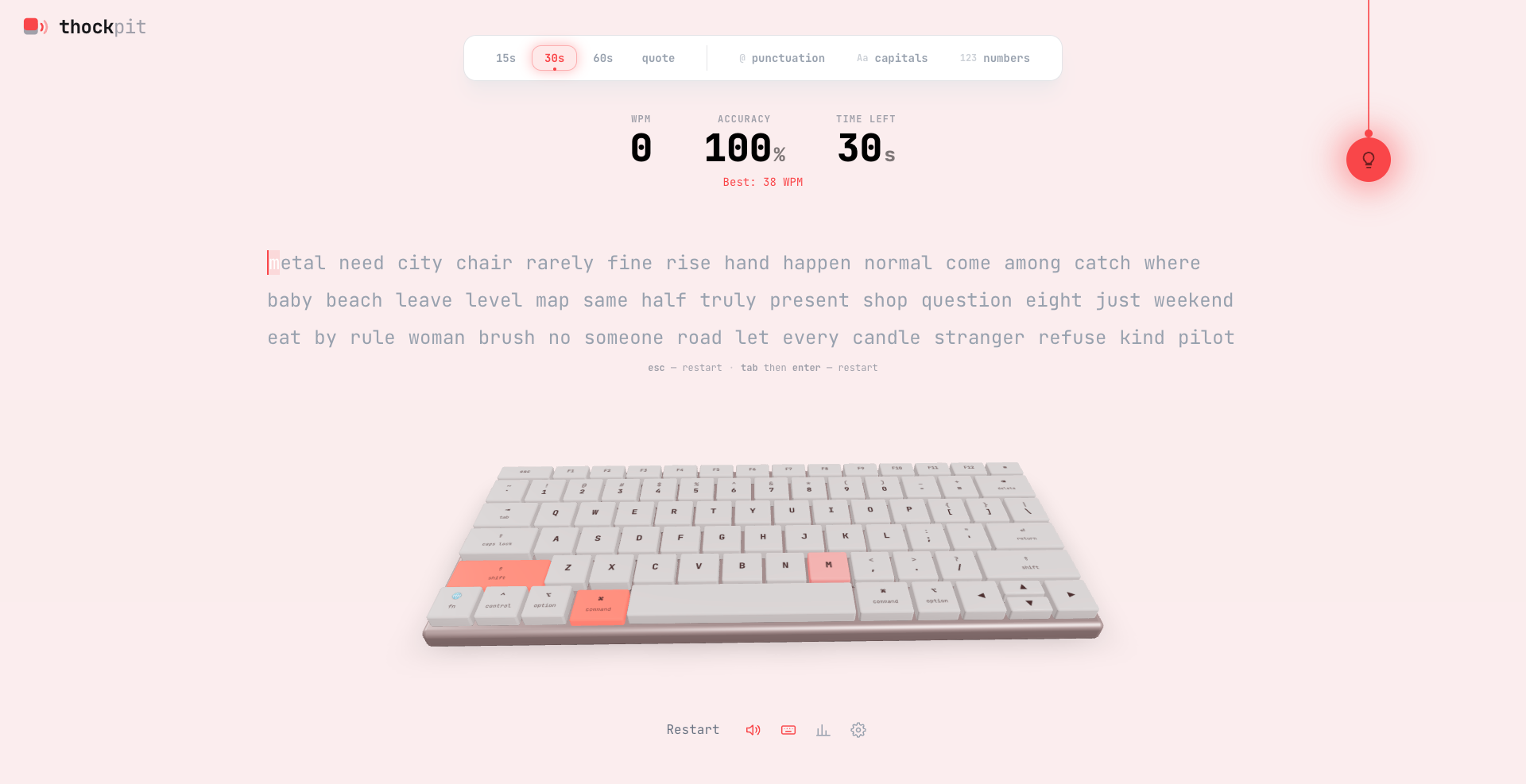
A typing test you can hear. A real MacBook keyboard rendered in Three.js sits under the words and reacts to every stroke — the right cap sinks, the next one glows, and 144 recordings of actual switches play back, detuned per keystroke so no two are alike. Six keycap-set themes head to toe, a 2D fallback board, a per-key error heatmap, input-only replay, and hand-drawn SVG charts of your speed each second. No backend — everything lives in the browser.
←Use arrow keys or swipe to navigate→
The Problem
Typing tests are a solved genre — Monkeytype won, and it is genuinely excellent. So why build another one? Because every one of them is silent and flat: a wall of words, a blinking caret, one graph at the end. Yet typing is among the most *physical* things we do at a computer — the sound and the feel of a board is the entire reason mechanical switches are a hobby — and not a single typing test lets you hear or watch the keyboard you are playing.
And the graph they hand you is the same graph every time: speed over time. None of them can point at the *one key* that is actually costing you — the ; you keep fumbling, the b you always miss under pressure. That data is sitting in every test ever taken; nobody draws it.
Thockpit is a typing test you can *hear*. A real MacBook keyboard, rendered in WebGL, sits under the words and reacts to every stroke — the right cap sinks, the next one glows, and a recording of an actual switch plays. When the clock stops you do not just get a speed line; you get the board back as a **heatmap of exactly which keys you keep missing**. No accounts, no backend, no telemetry — the whole thing runs in your browser.
My Role & Constraints
Solo Engineer & Designer — the 3D board, the typing engine, the audio pipeline, the charts, the six themes and every pixel of UI.
**Typing engine (useTypingEngine.ts):** holds the words, the per-character state (idle / correct / incorrect / current), the timer and the stats. Input arrives through a hidden <input>, so the browser's own text handling — backspace, key-repeat, IME — does the boring work. While a test runs it takes **one sample per elapsed second** (wpm, raw, and mistakes made in that second); that array becomes the result graph. An untouched test is never saved.
**The boards (Keyboard3D / Keyboard2D):** one layout table in utils/keyboard.ts — the real US-ANSI MacBook, down to the key widths (1.5u delete, 1.75u caps lock, 2.25u shifts, an inverted-T arrow cluster, home-row bumps on F and J) — turned into positions once, then drawn two ways. The 3D board renders with React Three Fiber; the 2D board lays the same keys out as DOM tiles. A tiny KeyboardView picks between them, so the live test, the results heatmap and the replay all render whichever board you chose.
**Audio (useKeySound.ts):** a small Web Audio sample player. The AudioContext is created up-front in a suspended state and all samples for the chosen pack decode immediately, so the very first keystroke already has sound to play — a keydown only has to resume() it, which is the user gesture browsers require.
**Charts (ResultChart / HistoryChart):** hand-written SVG — scales, ticks, a hover crosshair, a tooltip and a screen-reader table, in about 200 lines each, no charting library.
**Theming (utils/themes.ts):** six keycap-set palettes, each an accent plus light/dark keycap colours, flowing to the whole UI through a single --accent CSS variable.
**Everything else:** the pull-chain lamp, the settings dialog, the personal-best celebration, share-to-image, input-only replay, and the all-time stats panel.
System Design / Architecture
Everything hangs off **one source of truth per concern** — one layout table, one theme variable, one typing-engine state — so the parts can never disagree with each other.
1$hidden <input> real browser key events2$│3$useTypingEngine words · per-char state · 1 Hz samples4$│ state5$┌─────────────────┼──────────────────┬──────────────────┐6$▼ ▼ ▼ ▼7$KeyboardView WordDisplay ResultChart useKeySound8$3D │ 2D coloured SVG chart Web Audio9$R3F │ DOM glyphs (no library) 12 packs · 144 wav10$└──────── one layout table · utils/keyboard.ts ────────┘11$│12$localStorage history (last 50) · prefs · theme
**The engine is a hidden input.** Rather than intercept raw keydown, the test focuses an off-screen <input> and reads what lands in it. That hands backspace, key-repeat and IME composition to the browser, which already does them correctly — the engine only diffs the input value against the target words and colours each character.
**Two boards, one table.** utils/keyboard.ts is the single layout definition; both Keyboard3D and Keyboard2D read from it, so they can never drift apart. The 3D caps genuinely sit *above* the deck plane, so they parallax and cast shadows as the board tilts toward the cursor; the 2D board is the same keys as flat tiles for anyone who wants less. Key legends are drawn to a <canvas> and used as textures, so no font file has to load and nothing goes fuzzy when the board scales.
**The board is fitted, not placed.** Sizing the camera with trigonometry looks right until it is not — because the caps project *wider* than the deck's own footprint and the board yaws with the cursor, both of which push fn and the right arrow out of frame. The camera rig instead measures the board's real bounding box and binary-searches the closest distance that still projects all eight corners inside the view, so it is correct at any aspect ratio.
**Sound is real recordings, scheduled carefully.** Each pack carries a different press sample *per keyboard row*, dedicated samples for the stabilised keys (space, enter, backspace), and an up-stroke for the release. Every press is detuned a few percent at random, so two strokes of the same key are never identical, and all samples play through a compressor, so fast typing never clips.
**The theme rides on a variable set after mount.** --accent is written to <html> imperatively, in an effect once the client has mounted — never in the server-rendered markup — so a stored theme cannot clash with what the server drew and leave the wrong colour stuck on load.
**Persistence is the whole backend.** The last 50 runs and every preference live in localStorage. There is no server, no account and no network call — which is the point.
Key Engineering Decisions
- •One layout table drives both boards. `utils/keyboard.ts` is the single definition of the keyboard; the 3D board and the 2D board both read from it, so a pressed key, the next-key glow and the results heatmap are identical on either — they cannot disagree, because there is nothing to disagree with.
- •Fitted the WebGL camera by measurement, not trigonometry. The keycaps stand above the deck plane and the board yaws with the cursor, so a distance derived from the deck's footprint clips `fn` and the right arrow. The rig measures the real bounding box and binary-searches the nearest distance that keeps all eight corners in frame — correct at any aspect ratio. (drei's `<Bounds>` fits a bounding *sphere*, which for a board this wide and flat overshoots and leaves it tiny.)
- •Put the theme on a CSS variable written after mount. Reading the stored theme during render would make the server draw amber and the client draw your real colour — a hydration mismatch, which browsers refuse to patch up, so the wrong accent sticks. `--accent` is set in an effect once mounted, and nothing theme-derived ever appears in the server markup; `<body>` also carries `suppressHydrationWarning` because extensions inject attributes there before React loads.
- •Dark stays true black; only light mode gets an accent tint. A faint wash of the theme colour reads as a tasteful hint over a near-white page, but over near-black it just turns muddy — so dark keeps its real `#0f0f0f`.
- •The result graph has exactly one y-axis. Monkeytype-style charts often put errors on a second scale, and two y-scales in one chart is the single most misleading thing you can do to a reader. Errors ride on the raw line instead — same scale, no second axis — and both lines are labelled directly, so identity never rests on colour.
- •Real switch recordings, not synthesis — and scheduled like an instrument. A different press sample per keyboard row (so the board sounds uneven the way a real one does), dedicated samples for the stabilised keys, an up-stroke for the release, a few percent of random detune per press, and a compressor on the output so 150 wpm never clips or lags.
- •Built the per-key heatmap, because it is the one thing every other typing test cannot show you. When the test ends the board comes back coloured by how often you actually hit each key — green clean, amber slipping, red trouble, grey untouched. Every test hands you a speed graph; none of them can tell you your `;` is the problem.
- •Decode all samples up-front through a suspended `AudioContext`. The context is created suspended at load and every sample for the pack is decoded immediately, so the first keystroke already has audio ready — the keydown only has to `resume()` the context, which is the exact user gesture browsers require before any sound may play.
- •Kept replay in memory only, not `localStorage`. A minute of fast typing is a thousand keystrokes; fifty of those runs would blow the storage quota. So the board can type your test back to you — same keys, same timing, same sounds, including every mistake and backspace — but only until you reload.
- •Tracked the pull-chain drag on `window`, not with pointer capture. `setPointerCapture` retargets the follow-up `click` to the capturing element, so a plain tap on the lamp never reached the button and the theme would not toggle. Tracking the drag on `window` instead fixes it while keeping the lamp a real, keyboard-focusable `<button>`.
- •Stopped the page-wide focus handler from stealing clicks. Clicking anywhere refocuses the hidden typing input — which snatched focus off the controls and closed a dropdown the instant it opened. Interactive controls stop the click propagating, and the panels blur the input while they are up, or keystrokes would quietly run a test behind them.
- •Drew key legends to a canvas texture instead of loading a font into WebGL. No font file to fetch, and the labels stay crisp at any board scale because the texture is regenerated to fit rather than sampled down.
Business / Product Thinking
Thockpit is a **craft piece** — a project that argues for taste and front-end depth rather than backend scale. There is no database to hide behind; every bit of the impression is interaction, rendering and sound.
**Who it is for:** developers who care about typing (a large, opinionated crowd who will notice every detail), the mechanical-keyboard community, and anyone evaluating front-end, WebGL or interaction-design skill. It is the kind of thing that gets shared *because* it is delightful, not because it is useful.
**The hook is thirty seconds long.** Turn the sound on and type one test. The board tracks your fingers, the next key glows, a real switch clicks under every letter — and then the results screen hands you a heatmap of the keys you fumbled, which no other typing test can do. That is the entire pitch, and it lands before anyone reads a word about how it was built.
**Go-to-market:** live at thockpit.vercel.app → GitHub with a full engineering write-up. MIT-licensed and **backend-free**, so it deploys as a static export anywhere and costs nothing to run. The switch recordings are credited to tplai/kbsim.
**What it signals:** most portfolio projects prove you can wire a form to a database. This one proves the harder, quieter things — WebGL camera-fit math, Web Audio scheduling, hand-drawn SVG charts, hydration-safe theming and real accessibility — the craft that does not show up in a feature list but is instantly felt.
Results & Impact
Live at thockpit.vercel.app with source at github.com/subhm2004/Thockpit.
**Shipped (the board):** a real US-ANSI MacBook keyboard in WebGL via React Three Fiber — actual keycap geometry, lights, shadows and a deck that tilts with the cursor · the **next key** pulses in the accent, a capital also lights the correct **opposite shift**, and on a phone (no key codes) the key is inferred from the character that lands · a full **2D board** fallback reading the same layout table · a camera that measures the board and fits all eight corners at any aspect ratio.
**Shipped (sound):** **12 switch packs, 144 recordings** — a different press sample per keyboard row, dedicated samples for the stabilised keys, and an up-stroke on release · a few percent of random detune per press so no two strokes match · all samples decoded up-front through a suspended AudioContext and played through a compressor · haptics on devices that support them, a silent no-op where they do not.
**Shipped (feedback + data):** a **per-key error heatmap** on the results board · **WPM · raw · accuracy · consistency** (consistency is the inverted coefficient of variation of per-second raw speed) · a hand-drawn **SVG speed-per-second chart** with wpm and raw lines, error marks and a hover readout · **input-only replay** that types your test back · a personal-best celebration (a wave rolling out from the middle of the board over a rising arpeggio) · **share-to-image** to the share sheet, clipboard or downloads · an all-time **stats panel** over the last 50 runs.
**Shipped (themes + polish):** **six keycap-set themes** applied head to toe through one --accent variable, light tint / true-black dark, remembered between visits · a **2D/3D toggle** · a **pull-chain lamp** you physically pull · a single settings dialog for theme, board, pack, visibility, haptics and sound · **15 / 30 / 60 s** timed modes and a **quote** mode, with backspace that reaches back into the previous word.
**Shipped (accessibility):** every chart ships an sr-only table of the same numbers · series are direct-labelled so a colourblind reader never has to separate accent from grey · the lamp is a real focusable <button> · the stats and settings panels are labelled dialogs that close on Escape.
What I'd Do Differently
The honest gap is prefers-reduced-motion: the intro banner respects it, but the app itself does not yet — the board's tilt and the next-key pulse keep animating regardless. That is the first thing I would fix.
Beyond that, everything is local to one browser by design, which is also its ceiling: no cross-device history, no global leaderboard, and a cleared localStorage takes your records with it. Replay is deliberately memory-only, so it is gone on reload. The layout is US-ANSI only — other physical layouts and non-Latin languages would each need their own table and word list. And the 144 samples add roughly 600 KB to the first load; lazy-loading a pack only when it is chosen would trim that for the default visitor. None of these are hard; they are the difference between a polished toy and a product, and I stopped where the craft was proven.